Pam is a minimalist command-line interface (CLI) tool written in Go, designed to simplify managing and executing SQL queries across multiple databases. Inspired by “The Office,” Pam pays homage to the character who organizes everything efficiently.
Key Features
- Query Library: Save and organize your most-used SQL queries for easy access and reuse.
- Multi-database Support: Compatible with PostgreSQL, MySQL, SQLite, Oracle, SQL Server, ClickHouse, and Firebird.
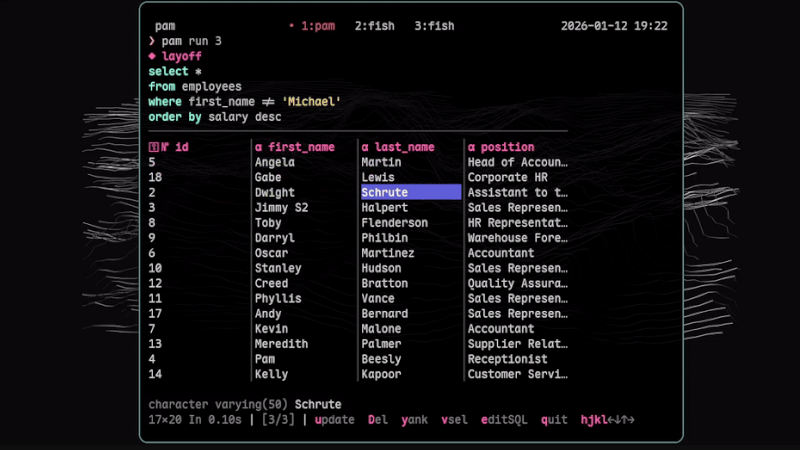
- TUI (Terminal User Interface): Keyboard-focused navigation with Vim-inspired shortcuts for efficient manipulation of query results.
- Direct Editing: Update cells, delete rows, and edit SQL directly in the results table.
- Data Export: Export results in formats such as CSV, JSON, SQL, Markdown, or HTML.
- Parameterized Queries: Support for parameterized queries, enabling dynamic searches without rewriting SQL.
Installation
You can install Pam via Go, by downloading the binary directly from the releases repository, or using Nix/NixOS.
go install github.com/eduardofuncao/pam/cmd/pam@latestBasic Usage
After installation, initialize a connection to your desired database:
pam init mydb postgres "postgresql://user:pass@localhost:5432/mydb"Add queries to your library:
pam add list_users "SELECT * FROM users"And run them interactively:
pam run list_usersThe TUI interface supports Vim-like shortcuts (j, k, h, l), copy cell (y), export data (x), edit cell (u), delete row (D), and more quick commands.
Pam stores its configuration in ~/.config/pam/config.yaml, allowing you to adjust row limits, column widths, and color schemes for the interface.
The app provides example commands for easily connecting to various database types, including PostgreSQL, MySQL, SQL Server, Oracle, SQLite, ClickHouse, and Firebird.
For more information, visit the repository