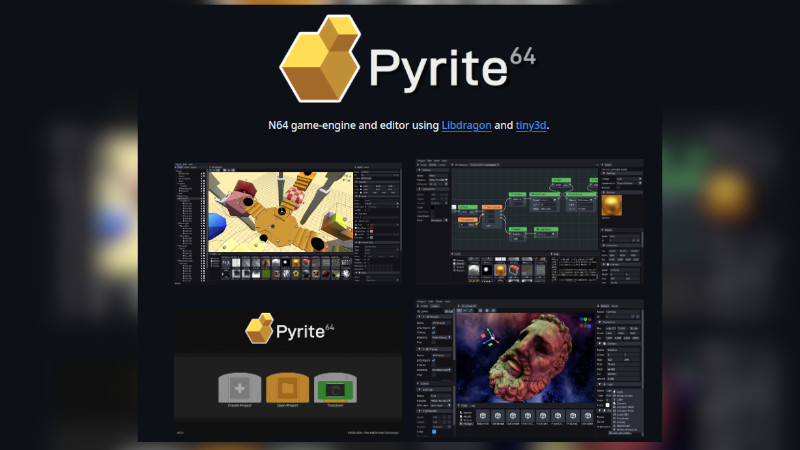
Pyrite64 is an open-source engine + visual editor for creating native 3D Nintendo 64 games — not “N64-style”, but games that actually run on original hardware or accurate emulators. For development (scripting) with C++ or C
What’s the idea?
- Replace the old workflow (confusing SDKs + broken toolchains)
- Bring something closer to Unity/Godot, but focused on the N64
- Generate real ROMs compatible with the console
Features:
- Visual editor with scene management
- Model import (GLTF / Blender + Fast64)
- Node graph (basic visual scripting)
- Runtime engine (rendering, collision, audio, etc.)
- HDR + bloom adapted for N64
- Asset manager with automatic cleanup ([AlternativeTo][2])
Installation
Windows
The project itself automates almost everything.
- Download the release (or clone the repo)
- Run the editor
- It automatically installs everything:
GNU/Linux
Dependencies:
Then just clone, compile, and install
git clone https://github.com/HailToDodongo/pyrite64
cd pyrite64
mkdir build && cd build
cmake ..
make
sudo make install
Getting Started
- Create a project
Inside the editor:
- New Project
- Set name + folder
- It creates the structure with
project.p64proj
- Configure toolchain + emulator
File:
project.p64proj
Important fields:
"pathEmu": "ares",
"pathN64Inst": "/path/to/toolchain"
pathEmu→ emulator commandpathN64Inst→ toolchain root ([Instagit][3])
- Import assets
Typical workflow:
- Model in Blender
- Export GLTF
- Import into the editor
- Build the scene
- Add objects
- Adjust transforms
- Define materials
- Game logic
Two options:
- Node graph (visual)
- C++ (more control)
- Build and run
- “Run” button
- Generates ROM
- Opens automatically in the emulator
For more information, visit the official website with FAQ.