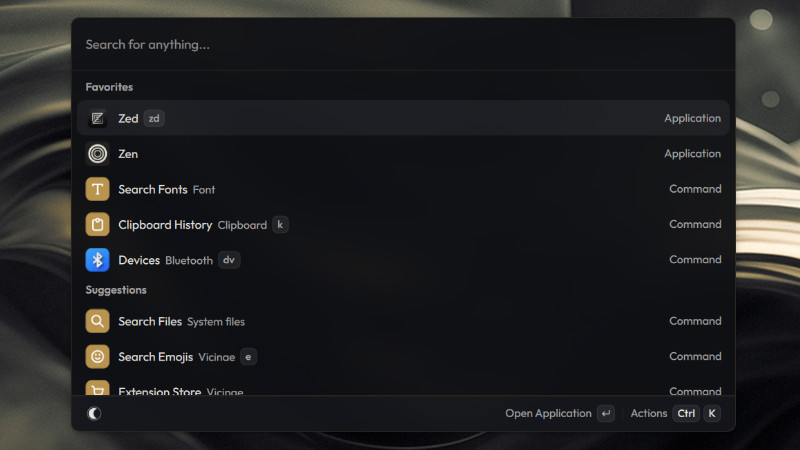
If you enjoy the Raycast experience but use Linux, you’ve probably already looked for a truly fast, modern, and extensible alternative. Vicinae was created exactly with that goal in mind.
Vicinae is a launcher written in C++ and Qt, offering native performance, low resource consumption, and compatibility with various extensions from the Raycast ecosystem available for GNU/Linux.
Available features include:
- Application search and launching
- Clipboard history
- File search
- Built-in calculator
- Emoji picker
- Quick window switching
- Volume control
- Browser tab search
- Text expansion (snippets)
- Installed fonts navigation
Installation
There are several ways to install it.
- AppImage
Download the AppImage from the project’s Releases page:
Then (example for x86_64):
chmod +x vicinae-vX.Y.Z.AppImage
./vicinae-vX.Y.Z.AppImage server- If your system does not have FUSE support:
./vicinae-vX.Y.Z.AppImage --appimage-extract
cd squashfs-root
./AppRun- You can also download the file:
vicinae-linux-x86_64-vX.Y.Z.tar.gzThen:
tar -xzf vicinae-linux-x86_64-vX.Y.Z.tar.gzCopy the executable to a directory in your PATH, such as:
~/.local/binUsage
After installation, the first step is to start the service:
vicinae serverIf an instance is already running:
vicinae server --replaceOnce the server is running, simply use the configured shortcut (or create one in your graphical environment) to open the interface.
You can also control the launcher via the command line:
vicinae openClose:
vicinae closeToggle between open and closed:
vicinae toggleCalculator
Type an expression:
125 * 48or
sqrt(144)The result appears immediately. Other features include: emoji, snippets, …
For more information, visit: the repository.